Logo of TAGGRS, written in blue and with a small favicon
HomeServer-side TrackingMeta CAPI Gateway
SERVER-SIDE TRACKING
Get started
Get started with TAGGRSSet up Google Tag ManagerConfigure the subdomainAdd the GTM Data LayerConfigure GTM transformationsTest the setupDebuggingAnalytics dashboard
Migrate from Google CloudMigrate from hosting
Shortcuts
GTM Copy PasteReady-made templates
GA4 Server-side Tracking
Setup in GTMCreate GA4 Event TagsGA4 tag setup in server containerE-commerce events in GTM
Google Ads Server-side Tracking
Install Conversion LinkerSet up Conversion TrackingConfigure Enhanced ConversionsDeploy Remarketing TagsInstall Offline Conversions
Facebook Server-side Tracking
Set Meta PixelImprove your EMQ ScoreInstall Meta CAPIMeta Events Deduplication
LinkedIn Server-side Tracking
Install LinkedIn Insight TagSet up LinkedIn CAPILinkedIn Events Deduplication
TikTok Server-side Tracking
Set up TikTok PixelInstall TikTok Events APITikTok Events Deduplication
Pinterest Server-side Tracking
Set up Pinterest TagConfigure Pinterest Conversions APIPinterest Events Deduplication
Snapchat Server-side Tracking
Set up Snap PixelSnapchat Conversions APISnapchat Events Deduplication
TAGGRS Tracking Tags and Tools
Tracking TagsGoogle Service Account integrationProfit TrackingData Enricher ToolWebhooks TesterEnhanced Tracking ScriptMulti Domain ToolClick ID RecoveryConsent Approval Graph
Configurations
Billy Grace Server-side TrackingLeadPages Server-side TrackingPiwik PRO Server-side TrackingCDN Server-side TrackingShopify Server-side TrackingActiveCampaign Server-side TrackingKlaviyo Server-side TrackingSpectacle Server-side TrackingEulerian Server-side Tracking
Server-side Tracking for e-commerce
Shopify Data LayerShopware Data LayerMagento Data LayerWooCommerce Data LayerPrestashop Data LayerLightspeed Data Layer
Consent Management server-side
Activate Consent ModeConfigure AxeptioConfigure Cookie Confirm
META CAPI GATEWAY
ACCOUNT SETTINGS
User roles and accessSSO

Consent Approval Graph

Consent Approval Graph is a feature within TAGGRS Server-Side Tracking that provides advanced consent measurement and Consent Mode V2 analytics. It allows you to measure your website’s real consent transmission and understand how traffic may be affected by consent restrictions.
After enabling Consent Mode in your tracking setup, this feature gives you visibility into what is actually being sent to Google: not just what users click in your cookie banner.
This distinction matters more than ever with Consent Mode V2 and stricter regulatory requirements.
Logo of TAGGRS Server-side Tracking: a light blue circle with two blue angle brackets
Consent Mode V2 introduces stricter requirements for ad_user_data and ad_personalization signals, particularly for Google Ads and remarketing within the European Economic Area (EEA).

What Consent Approval Graph measures

Consent Approval Graph measures the actual consent signals transmitted through your tracking stack. Instead of focusing on banner interactions, it analyzes the consent state that reaches Google via parameters such as GCD (Google Consent Data) and gcs.
Consent approval analytics is a feature of TAGGRS server-side tracking software
This means you can see:
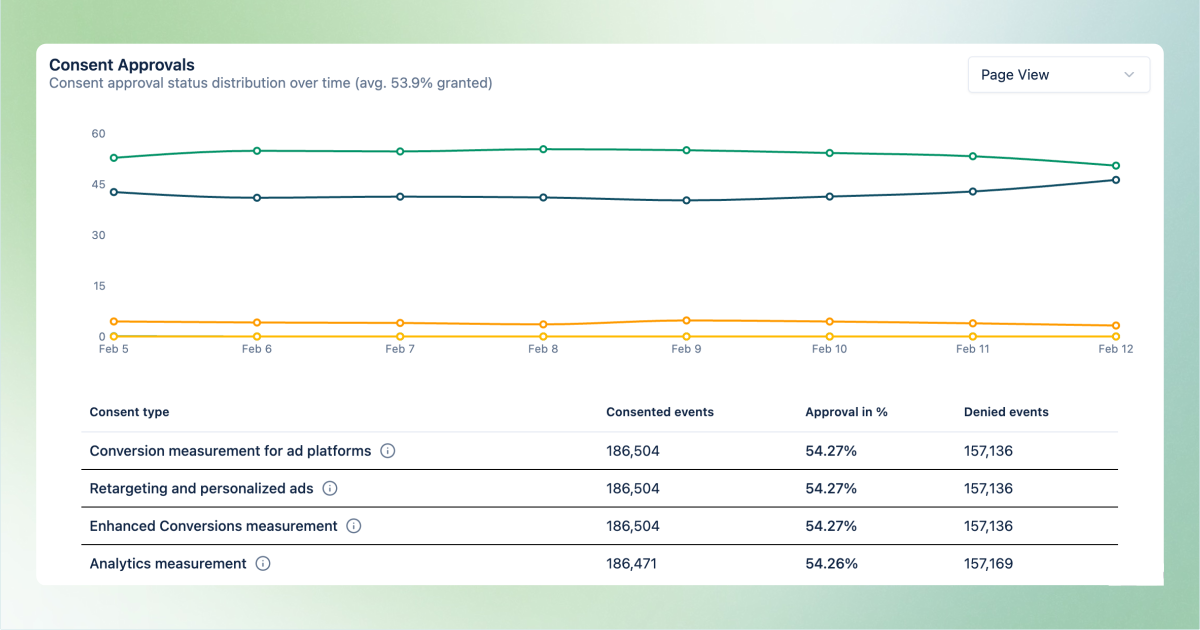
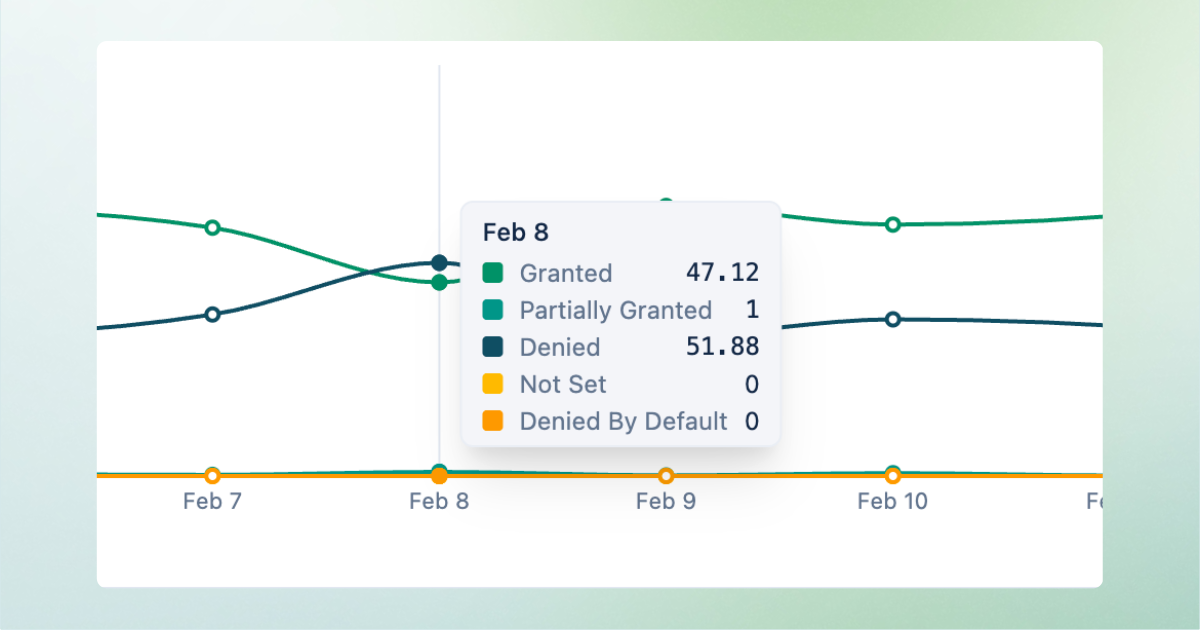
  • The % of traffic that is fully granted, partially granted, or denied
  • The % of traffic where no consent choice was made
  • How consent impacts conversion tracking.
It provides event-level insight into how consent states affect the transmission of advertising and analytics events, helping you understand how measurement and attribution may be impacted.
Consent approval analytics is a feature of TAGGRS server-side tracking software
Instead of guessing, you gain measurable proof.
Logo of TAGGRS Server-side Tracking: a light blue circle with two blue angle brackets
Consent Approval Graph does not provide or replace a cookie banner: it helps you understand the user behavior around that banner. You still need a CMP such as Cookiebot, OneTrust, Usercentrics, or another consent management solution.

Event-level consent by consent type

Consent Approval Graph reports consent at the event level. Each event is evaluated based on the active Consent Mode parameter at the moment it was sent to Google.
In TAGGRS software the consent acceptance rate is divided per behaviour: consent granted, denied, and everything in between
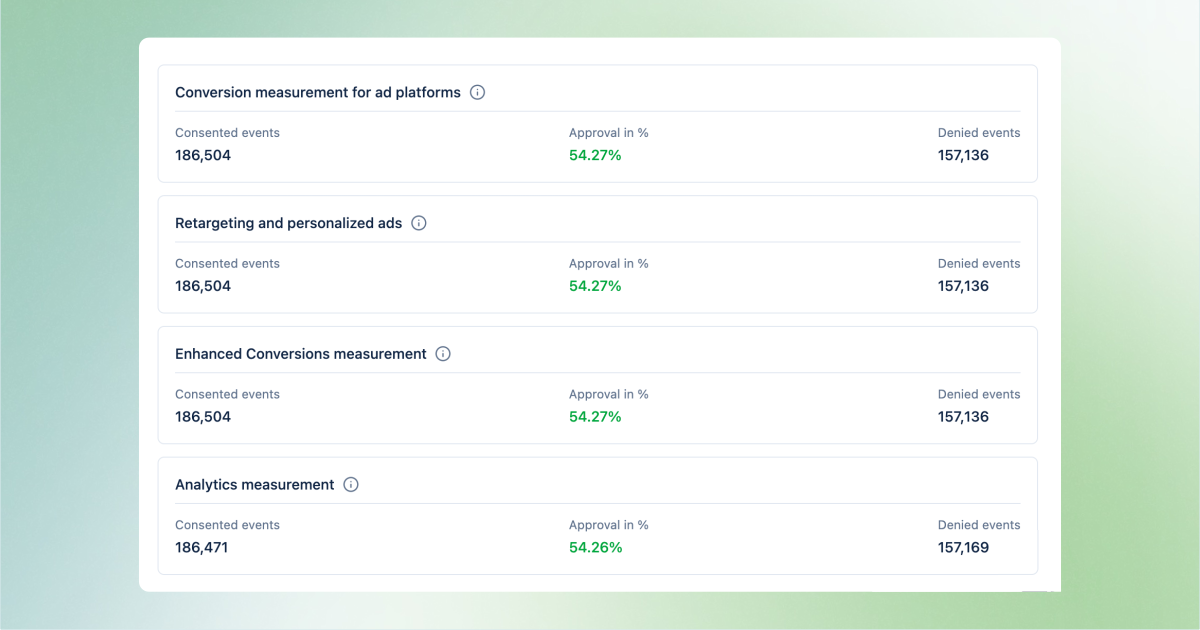
The dashboard groups consent into 4 consent types, each based on a specific Consent Mode parameter:
  • Conversion measurement for ad platforms: This is based on the ad_storage parameter. It determines whether advertising storage is permitted and whether user actions can be eligible for conversion attribution in platforms such as Google Ads.
  • Retargeting and personalized ads: This is based on the ad_personalization parameter. It determines whether users are eligible for remarketing and personalized advertising.
  • Enhanced Conversions measurement: This is based on the ad_user_data parameter. It controls whether user-provided data may be used for advertising purposes, including Enhanced Conversions.
  • Analytics measurement: This is based on the analytics_storage parameter. It determines whether user interactions may be stored and used for analytics reporting in GA4.
In TAGGRS software the consent acceptance rate is divided per behaviour: consent granted, denied, and everything in between
This event-level visibility categorizes events based on the consent type and state attached to them, giving you a technically accurate view of how Consent Mode affects advertising eligibility, remarketing, Enhanced Conversions, and analytics measurement within your Server-side Tracking setup.

How to activate Consent Approval Graph

1. Activate Consent Mode V2 in your product, ensuring your web container is passing consent states to the server container in GTM. Learn how in this guide.
2. Select which consent parameters to track (e.g., ad_storage, analytics_storage, ad_user_data, ad_personalization)
3. Optionally, configure additional parameters for custom consent workflows.
Once active, the dashboard will begin reporting real-time consent transmission data.

Why your consent rate differs from your CMP

Most CMPs measure how many users click “accept” or “decline” on the banner interface. That is a user interaction metric.
Consent Approval Graph measures the actual Consent Mode parameters attached to each event when it is sent to Google. These include ad_storage, analytics_storage, ad_user_data, ad_personalization, and the technical GCD and gcs values.

Because the measurement method is different, the percentages may differ. For example, a user may click “accept,” but if:
  • The consent state isn't correctly passed to the server container
  • A tag fires before the consent update is processed
  • The consent signal is overwritten by another script
  • The user closes the banner without making an explicit choice
This is why Consent Approval Graph provides the more accurate reference point for performance analysis and modeling eligibility: it shows what platforms actually receive and act upon.

Identifying lost data and “No choice” traffic

One powerful insight is the percentage of visitors who make no explicit consent choice. In many cases, users close the banner without accepting or rejecting. Depending on your configuration, this can result in no measurement or limited measurement. In previous analyses, we have seen cases where rejection rates were only 10–20%, but total measurable data loss exceeded 50% because users ignored the banner.
Consent Approval Graph helps you understand this “black box” and quantify the true impact on your tracking.

FAQ

Does this tool replace our cookie banner?

No, Consent Approval Graph analyzes consent transmission. It does not manage consent collection. You must use a CMP for banner functionality.

Can this help recover lost revenue?

Yes, by identifying denied consent, ignored banners, or misconfigured parameters, you can optimize your consent strategy and increase the amount of measurable data. Many organizations recover significant tracking visibility after making data-driven banner improvements.

Does Consent Approval Graph help with GDPR compliance?

Consent Approval Graph does not replace legal compliance or a CMP. However, it helps you technically validate whether consent signals are correctly transmitted and aligned with Consent Mode V2 requirements. This supports a technically compliant Server-side Tracking setup and improves transparency in how user consent signals affect data processing and measurement.

Useful resources

icon of a white thunder used by TAGGRS to visually introduce Server-side Tracking
Learn more about Google Consent Mode
icon of a white upward arrow
icon of a white thunder used by TAGGRS to visually introduce Server-side Tracking
Start for free with Server-side Tracking
icon of a white upward arrow
White silhouette of a person used as icon for the support call to action
Get expert support
icon of a white upward arrow
Previous
Click ID Recovery by TAGGRS
Next
Billy Grace Server-side Tracking
DOCUMENTATION V1.4
Copyright © 2026 TAGGRS. All right reserved.
TABLE OF CONTENTS
What Consent Approval Graph measuresEvent-level consent by consent typeHow to activate itConsent rates differencesDeeper insightsFAQUseful resources